
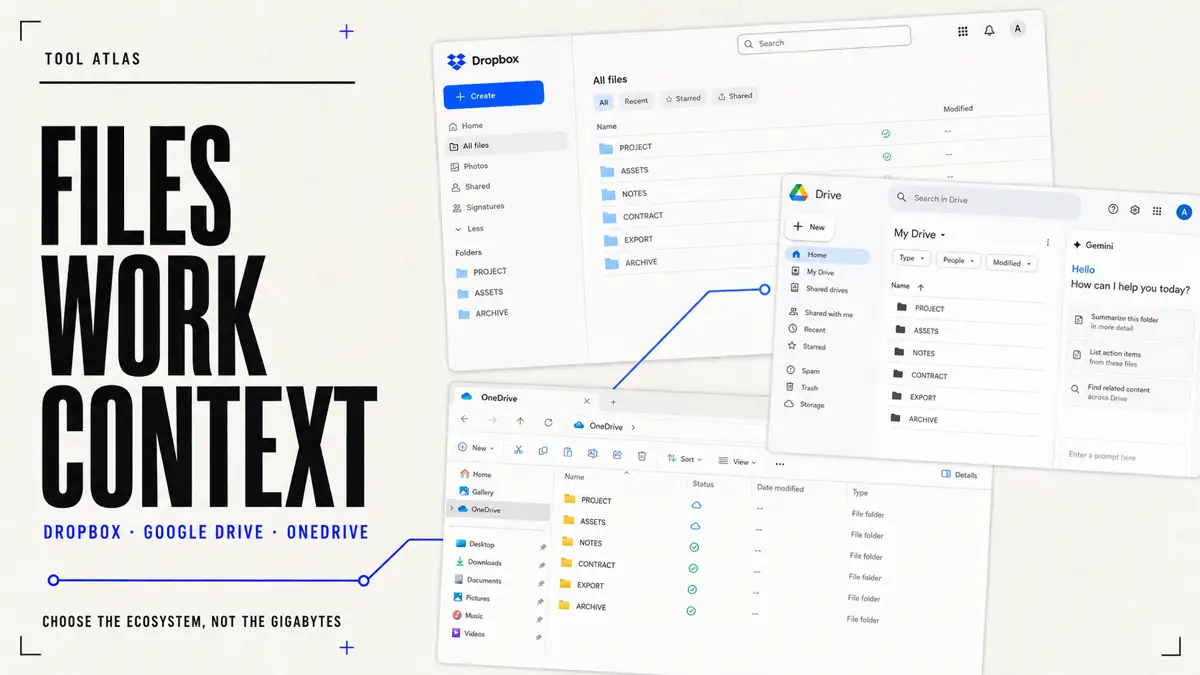
Cloud storage used to be one of the simplest categories in software. You paid for a bucket of gigabytes, installed a sync client, and forgot about it. That era is ending. Dropbox, Google Drive, and Microsoft OneDrive are becoming the file layer underneath three much larger ways of working: Dropbox is extending file search across connected applications through Dash, Google is putting Gemini inside Drive and Workspace, and Microsoft is connecting OneDrive files to Copilot, Windows, and Microsoft 365.7, 9, 15
That changes the useful question. It is no longer only, “Which service gives me the cheapest terabyte?” It is, “Which company do I want to become the operating system for my digital files?” The answer depends less on a feature checklist than on where documents are created, which devices must stay in sync, who receives outside links, how often large conventional files move, and which recovery route still works after a mistake.3, 9, 13
The short answer is direct. Dropbox is the better pure file platform. Google Drive is the better Google workspace. OneDrive is the better Microsoft workspace. That is not a permanent ranking. It is a decision rule: choose the product that removes the most friction from the work you already do, then test its sharing, offline, permission, recovery, and exit behavior with real files before moving the authoritative copy.3, 9, 14
Cloud storage is becoming an AI platform
For most of the last decade, Dropbox had the easiest story to explain. Dropbox was where files lived. Google Drive was where Google Docs lived. OneDrive was where Microsoft wanted Office files to live. That distinction is becoming less useful because each company now treats stored files as context for search, summarization, collaboration, or automation.7, 9, 15
Google describes Drive as AI-powered cloud storage inside Workspace. Its current Drive surface connects files with Docs, Sheets, Slides, Gmail, Meet, and Gemini. Gemini can help find information, summarize material, and work with Drive content, while Google presents the same identity, access, and data protections as part of the wider Workspace environment.9, 11, 12
Microsoft is moving in a parallel direction. Copilot in OneDrive can summarize supported files, answer questions about their contents, and compare selected documents without requiring the reader to open each one first. Files On-Demand makes the storage layer visible through Windows File Explorer, so OneDrive can feel less like a destination website and more like part of the operating system.15, 14
Dropbox is making a different bet. Dash is positioned as search across connected work applications rather than intelligence limited to files stored in one suite. Dropbox says Dash can connect to tools such as Microsoft OneDrive, Google Drive, Gmail, Notion, and Slack, then help a user locate and work with information across those sources. Connector availability, administrator controls, and AI behavior can change by plan, so this is a strategic distinction rather than a promise that every account searches every application.7
This gives the three products different centers of gravity. Google wants Drive to become the memory of Google work. Microsoft wants OneDrive to become the file memory of Windows and Microsoft 365. Dropbox wants to remain useful when work is fragmented across several ecosystems. In 2026, that boundary matters more than the logo next to a folder.7, 9, 15
Dropbox pricing vs Google Drive pricing vs OneDrive pricing
Pricing still matters, but headline storage is a poor comparison unit. Prices vary by country, tax, billing cycle, promotion, account type, and included software. The table below is a U.S. consumer snapshot checked on 2026-08-14, not a permanent quote. Open the regional checkout before purchasing and separate the storage allowance from the applications, AI access, recovery, sharing, and family or team rules included with it.1, 10, 13
| Service | Free storage | Notable paid personal route | What the purchase is centered on |
|---|---|---|---|
| Dropbox | 2 GB | Plus: 2 TB for $9.99/month on the checked U.S. page | File storage, synchronization, sharing, transfer, and recovery |
| Google Drive / Google One | 15 GB shared with Gmail and Google Photos | Storage plans and Google AI plans vary by tier and region | Storage across Google services, with wider Google and Gemini benefits by plan |
| OneDrive / Microsoft 365 | 5 GB | Microsoft 365 Personal: 1 TB for $9.99/month or $99.99/year on the checked U.S. page | OneDrive storage plus Microsoft 365 applications and benefits |
At first glance, Dropbox has the least generous free allowance. Its Basic account offers 2 GB, while a Microsoft account includes 5 GB of OneDrive storage and a Google account includes 15 GB shared across Drive, Gmail, and Google Photos. Dropbox Plus is easier to understand as a direct file subscription: the checked plan page centers the offer on 2 TB of storage, file delivery, synchronization, and a 30-day recovery window.1, 2, 10, 13
Comparing only gigabytes misses the economics of OneDrive. Microsoft 365 Personal bundles 1 TB of OneDrive storage with desktop and mobile productivity applications. Someone who already needs Word, Excel, PowerPoint, Outlook, or the broader Microsoft 365 package may treat the storage as infrastructure included in an existing purchase rather than as another independent cloud bill. A family plan may aggregate several individual allowances, but those allowances belong to separate people; they are not automatically one shared pool for a single account.13
Google follows the same ecosystem logic. A Google account's free capacity is shared across Drive, Gmail, and Google Photos. Google One and Google AI plan pages combine storage with different consumer benefits, and the exact storage and Gemini allowances vary by tier and market. That means a user comparing “Google Drive price” must ask whether they are really buying file storage, photo and email headroom, wider Google benefits, or an AI subscription that happens to include storage.10, 11
The market is quietly moving from “pay us for storage” to “pay us for an ecosystem, and storage comes with it.” This is bad news for a chart that ranks products by cost per terabyte. It is useful for buyers who calculate the software they can remove, the collaboration they gain, and the switching work they accept.1, 11, 13
The real difference is workflow
The most important cloud-storage feature is often invisible: friction. Count how often people download, upload, convert, search, change permissions, create duplicate attachments, wait for a large folder, or switch applications before work is complete. A service becomes valuable when it removes those steps without hiding a new ownership, recovery, or lock-in problem.3, 9, 14
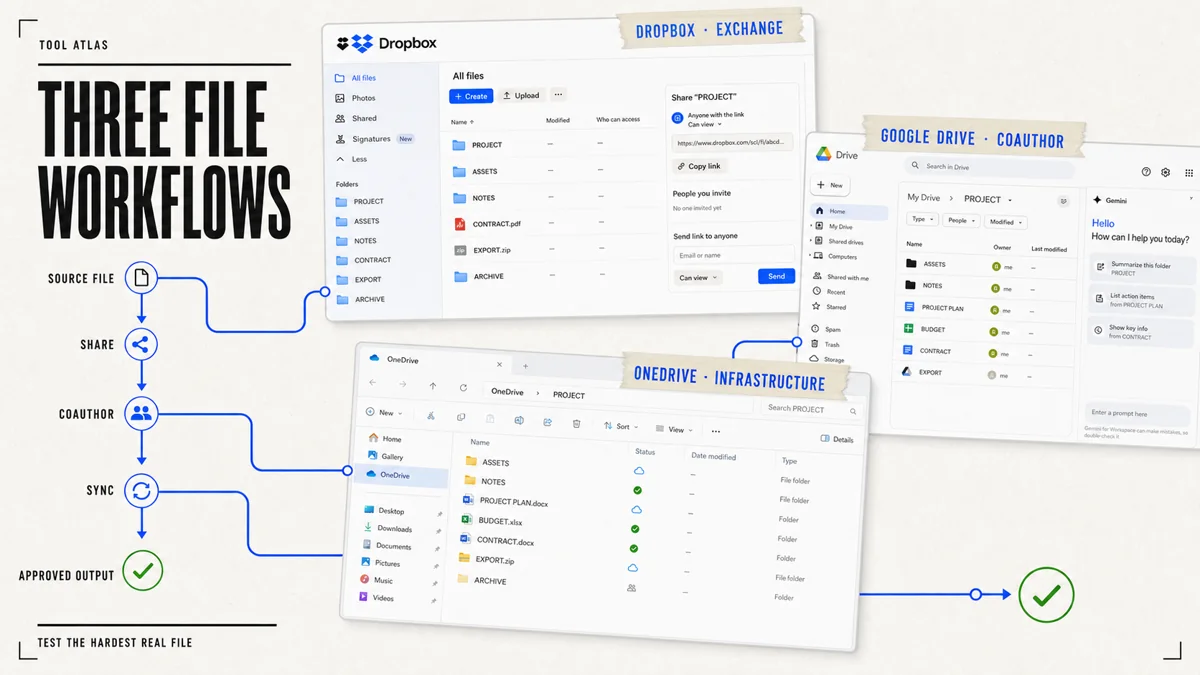
Google Drive is strongest when work already lives in the browser
Google Drive's advantage is not a folder. It is the surrounding Google environment. Files sit beside Docs, Sheets, Slides, Gmail, and Meet, with links and browser-native coauthoring forming the default handoff. Gemini adds another way to find and work with that context. A team whose normal route is Gmail → Drive → Docs → Sheets → Meet → Gemini pays less switching cost because fewer tasks leave the same identity and collaboration model.9, 11
This strength has a boundary. The 15 GB free allowance is shared with Gmail and Google Photos, so it can disappear for reasons unrelated to documents. Offline behavior must be configured and tested on the actual desktops and mobile devices the team uses. Conventional files still need a round-trip test when format fidelity, local applications, plug-ins, linked assets, or a long offline session matters.10, 9
Drive is therefore the natural default for a startup or organization already centered on Google Workspace, especially when the authoritative work is created in Docs, Sheets, or Slides. It is less automatically decisive when the main objects are large Adobe assets, complex local project folders, or Office files whose exact desktop behavior is part of acceptance.9, 12
OneDrive is strongest when Windows and Office are the workplace
OneDrive has a structural advantage Dropbox cannot reproduce: it is built into the Windows and Microsoft 365 route. Files On-Demand lets a file appear in File Explorer while remaining online-only until needed. A user can make selected files available offline or return them to online-only status to reclaim local disk space. For people who spend the day in Word, Excel, PowerPoint, Outlook, Teams, and File Explorer, OneDrive can feel like infrastructure rather than another application.14, 13
Copilot makes that loop more valuable on eligible plans and supported files. Microsoft's current OneDrive guidance describes summarizing files, asking questions, and comparing selected documents. The useful operating question is not whether a Copilot button exists. It is whether the team's actual PDFs, Word documents, spreadsheets, permissions, and retention rules work inside the licensed plan and approved data boundary.15, 18
This makes OneDrive difficult to beat for a Windows-heavy business that already pays for Microsoft 365. The recommendation becomes weaker when collaborators live across macOS, Linux, browser-only tools, outside agencies, or several unrelated software ecosystems. Deep integration removes friction for the standard environment and can add migration work when that environment changes.13, 14
Dropbox is strongest when the file itself is the center of work
Dropbox remains different because it cannot rely on a dominant office suite. It has to make file storage, synchronization, external sharing, online-only access, and cross-platform handoff unusually legible. Its desktop tools let users keep visible file libraries without storing every byte locally, while selective sync can remove folders from a device without deleting them from the account.4, 5, 3
That simplicity matters for photographers, video creators, designers, agencies, freelancers, and outside contractors working with conventional files. A PSD remains a PSD. A Premiere project remains a Premiere project. A ZIP delivery is not a collaborative Google Doc. When the file itself is the product moving between several tools and organizations, a neutral file layer can be more valuable than deeper integration with one document suite.3, 1
Dropbox is not automatically the winner for large files or external links. A buyer should pilot the largest representative folder, the most difficult client permission, an interrupted transfer, a filename collision, an offline edit, and a restore. The point is that Dropbox's product identity is centered on those jobs, while Google and Microsoft can make their storage more attractive by bundling it with the rest of the workplace.3, 6, 8
Gemini vs Copilot vs Dropbox Dash
The new comparison is no longer only “Which drive has the best sync?” It is also “Which system understands the context around my files?” Users increasingly expect to ask: Find the proposal from last quarter. Compare these contracts. Summarize the project. Locate the presentation containing a forecast. The scope of the answer depends on the product's search boundary, the connected sources, the account's permissions, and the licensed AI features.7, 9, 15
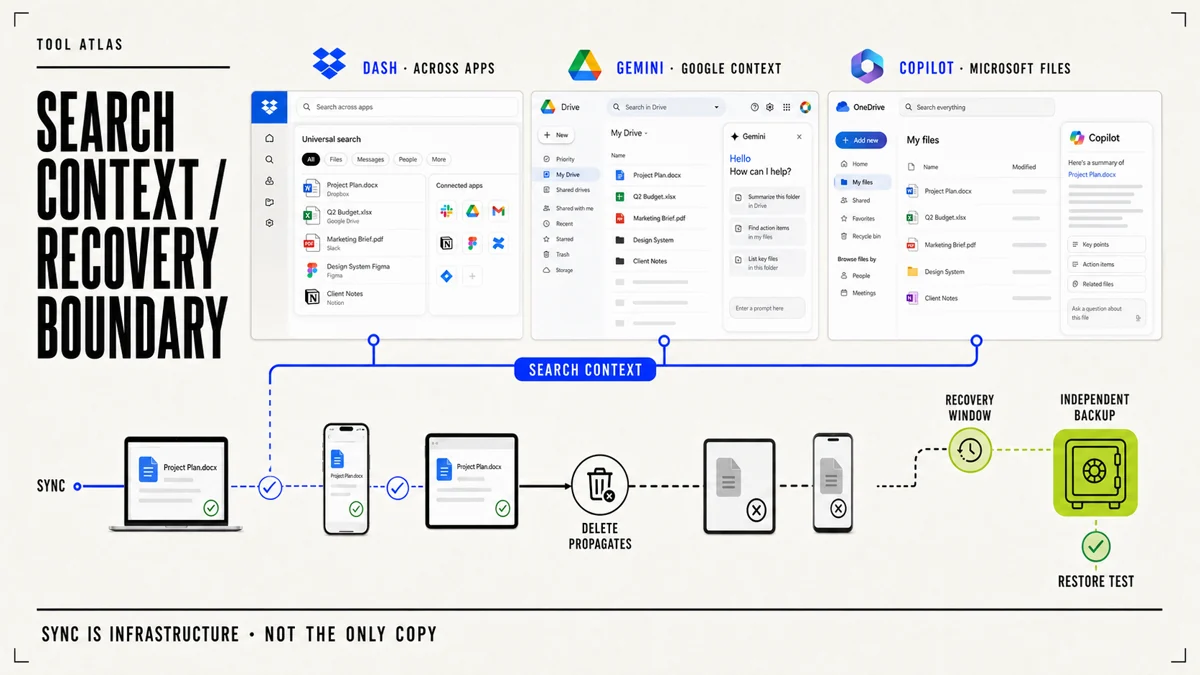
Gemini's advantage is Google context. Drive can be part of a wider Workspace route that includes Gmail, Docs, Sheets, Slides, Meet, and other Google services. For a Google-centered organization, that can reduce folder navigation and help connect a file to the work around it. It also makes Workspace identity, permissions, and AI data controls part of the purchase decision rather than a footnote.9, 12, 11
Copilot's advantage is the Microsoft document and operating environment. In OneDrive, it can work with supported files through Microsoft 365 surfaces, including summarization, questions, and comparison. This is especially relevant to analysts, consultants, lawyers, researchers, and corporate teams whose knowledge is stored in Word documents, PDFs, presentations, and spreadsheets and whose access is governed through Microsoft accounts.15, 18
Dash's advantage is fragmentation. Dropbox does not own Gmail, Office, Notion, or Slack, so it is trying to make cross-application search the product. That could be compelling for a mixed-tool company, but it increases the importance of connector scope, permission inheritance, indexing, administrator control, and data handling. “Searches across apps” should be tested with approved sources and representative permissions, not inferred from a demonstration.7, 8
The practical AI pilot is the same for all three. Select ten questions whose correct answer matters. Record which repositories each question should search, which files the user may access, what a correct citation or link looks like, how stale content is handled, and what happens when the answer is absent. Choose an AI layer only after it passes the organization's permission and source-boundary checks.7, 12, 15
Security, privacy, and recovery matter more in the AI era
The more intelligently a platform can search documents, the more important it is to separate encryption, privacy, account security, authorization, recovery, and backup. They are not synonyms. Encryption protects data in defined states. Privacy rules describe how data may be processed. Account security protects entry. Permissions decide who can see a file. Recovery helps reverse some mistakes. Backup preserves an independent route when synchronization, deletion, corruption, or an account problem propagates.8, 12, 18
Dropbox describes encryption in transit and at rest, account and sharing controls, and additional controls for eligible business plans. Its plan and version-history pages show that recovery periods differ by plan. This is useful, but a recovery window is not the same thing as an immutable archive, and the existence of version history does not prove that every file, shared item, or deletion scenario can be restored in the way a particular business requires.8, 6, 1
Microsoft documents encryption for OneDrive and SharePoint data and provides Personal Vault as an additional protected area for consumer accounts. Eligible Microsoft 365 subscriptions also include ransomware detection and file-recovery features. Buyers should still test the licensed account, retention behavior, restore scope, external sharing, and administrator route rather than treating the presence of a security label as a complete recovery design.18, 16, 17, 13
Google says Workspace protections and access controls extend to Gemini, and its AI privacy material describes how organizational data is handled for Workspace customers. Those statements matter for managed business accounts. They should not be copied blindly onto a consumer Google account, a different Gemini plan, or an unreviewed third-party connector. The product edition and account boundary remain part of the evidence.12, 9, 11
The operational rule is simple: do not let Dropbox, Google Drive, or OneDrive be the only copy of genuinely irreplaceable data. A synchronized deletion can propagate. Version history and ransomware recovery can be valuable, but their limits, plan eligibility, and retention windows must be known before the incident. Maintain an independent backup appropriate to the data and run a restore test instead of merely observing that a backup job reports success.6, 17, 9
Which is better: Dropbox, Google Drive, or OneDrive?
There is no universal best cloud-storage service because the products are no longer only storage services. There is a best operating fit for a particular user, team, file type, and ecosystem. Start with the work and use the price only after the workflow boundary is clear.3, 9, 13
Choose Google Drive if your digital work already revolves around Google. When Gmail, Docs, Sheets, Slides, Meet, and Gemini make up most of the route, Drive has the least friction. It is the natural default for browser-native collaboration and a strong choice for a Google Workspace organization. Remember that consumer storage is shared across Drive, Gmail, and Google Photos, and verify offline and conventional-file behavior with the real devices and formats that matter.9, 10, 11
Choose OneDrive if you live in Windows and Microsoft Office. Microsoft 365 can combine storage with the desktop applications a user already needs. Files On-Demand makes OneDrive part of the file system, and Copilot adds supported document questions, summaries, and comparisons. It is especially hard to displace in a Windows-heavy organization with Microsoft identity, Office files, Teams, and established administration.13, 14, 15
Choose Dropbox if file synchronization and cross-platform file exchange are the priority. It is compelling when work consists of conventional files, several device platforms, large project folders, outside clients, and applications from unrelated ecosystems. Dash extends the strategy toward cross-application search, but the durable reason to choose Dropbox remains a focused file layer whose sharing, sync, and recovery behavior survives the team's pilot.3, 4, 7, 6
For a freelancer, Dropbox can be the stronger client-asset exchange, while Google Drive can be better when collaboration happens primarily inside documents. For a Windows-heavy business, OneDrive is usually the economic and operational default. For a Google Workspace startup, Drive is the natural choice. For a creative agency moving Adobe files, Figma exports, photography, video, and contractor deliveries, Dropbox deserves a serious pilot.3, 9, 13
Before committing, run one bounded comparison with the same real project in all shortlisted services. Test initial upload, desktop synchronization, offline edits, simultaneous edits, an outside link, permission removal, a renamed folder, a conflict, an accidental deletion, version recovery, export, and account offboarding. Record which product completes the route with the least manual work and an acceptable ownership and recovery boundary.6, 9, 14, 17
That distinction explains the market better than a price-per-terabyte ranking. The winner is not simply the company that stores files most cheaply. It is the product that makes those files easier to create, find, share, recover, and eventually move without taking control away from the person or team that owns the work.3, 9, 14