

Start with the decision
Notion, Obsidian, and Feishu Docs can all capture information, but they embody three different models. Notion is a database-led workspace, Obsidian is a local-file-led personal knowledge base, and Feishu Docs is an organizational hub for collaboration and execution. Choose the product that should hold the authoritative copy of your knowledge, then judge its features against that role.3, 9, 15, 1
Obsidian is usually the stronger foundation for independent creators and anyone who values long-term control of their data. Notion often requires less effort for freelancers who need to structure content, projects, clients, and tasks. Feishu Docs is closer to a complete working environment for China-based teams that depend on real-time communication, collaborative editing, organizational permissions, and local workflows. Each route trades data control against collaboration speed and migration cost.3, 9, 15, 1
The most dangerous choice is not picking the wrong tool; it is maintaining the same material in all three and turning a “second brain” into three conflicting sources of truth. A more durable approach is to decide which knowledge must remain under personal control, which content requires shared stewardship, and then assign one authoritative home to each type of information.1, 2
Define the job each of the three systems performs
Personal knowledge management is often misunderstood as "finding a better note-taking software." However, from the perspective of personal information management research, the real problems always include the acquisition, preservation, organization, rediscovery, maintenance and control of information; personal knowledge management must further transform scattered data into knowledge that can support learning, judgment and work.2
This means that a system must answer at least five questions:1, 2
- how information initially enters the system;
- In what structure the content is saved;
- How to find the future again;
- Who can read, modify and distribute;
- Can the content continue to be used after payment is stopped or the platform disappears?
The Local First study further reminds us that offline availability, cross-device synchronization, multi-person collaboration and data ownership are not the same issues. A product can have legal ownership of user data but still make users highly dependent on the vendor's servers, proprietary data structures, and export mechanisms.1
Therefore, the core judgment framework adopted in this article is not "more functions or not", but the center of gravity of the three systems:1, 2
| Products | System focus | core data model | Strongest ability | fundamental cost |
|---|---|---|---|---|
| Notion | Structured workspace | Pages, databases, properties, views and relationships | Unify documents, projects, tasks and materials into a configurable database | The more complex the structure, the higher the migration and reconstruction costs. |
| Obsidian | Local-first knowledge base | Local Markdown files, properties, links and folders | Long-term control, offline access, two-way links and deep customization | Collaboration, permissions and maintenance rely more on users themselves |
| Feishu Docs | Organizational collaboration and execution | Cloud documents, knowledge bases, multidimensional tables and organizational permissions | Instant communication, multi-person editing, organizational search and permission management | Personal knowledge is easier to bind to organizational accounts, permissions and workflows |
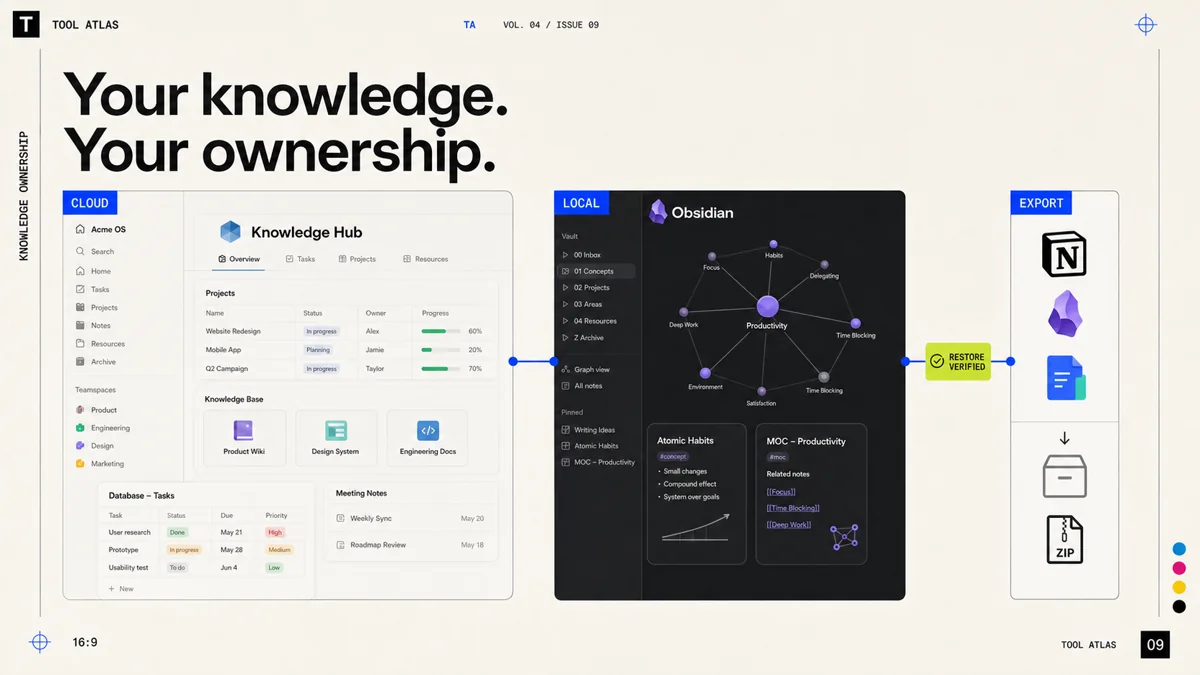
Notion officially defines a database as a set of pages that can have attributes, filtering, sorting, and multiple views, and provides capabilities such as templates, team spaces, permissions, APIs, import and export, and page history. Its design logic is not to "write a note", but to make the page an object that can be organized and calculated.3, 7, 8
Obsidian saves the content in a local plain text Markdown file on the user's device by default, and does not require account registration; capabilities such as bidirectional links, reverse links, graphs, searches, attributes, templates, and Bases are provided by core plug-ins. Users can also install community plug-ins or use other synchronization solutions.9, 10, 11, 12
Feishu Docs is part of the Feishu collaboration suite, covering documents, tables, multi-dimensional tables, slides, knowledge bases and multi-person real-time editing, and integrated with messaging, organizational structure, permissions, search and management background. Its basic unit is not just a "document", but a work object that is shared, discussed, approved and executed within the organization.15, 16, 17
Function comparison at a glance
The following functions and price status are based on public official information available on August 2, 2026. The actual version, region, and enterprise contract may change.1, 2
| Compare dimensions | Notion | Obsidian | Feishu Docs |
|---|---|---|---|
| core positioning | Structured documents, databases and project workspaces | Local-first personal knowledge base and Markdown editing environment | Cloud document, knowledge base and organizational collaboration platform |
| Default storage method | Vendor-hosted cloud workspace | Local files on the user's device | Feishu Cloud Workspace, Enterprise Edition provides more complex data governance options |
| Data format | Platform objects such as page blocks, databases, properties, relationships, etc. | Standard Markdown files, attachments and YAML attributes | Platform objects such as cloud documents, multidimensional tables, and knowledge bases |
| Offline capability | Supports offline use of the page; the paid version can automatically download recent and favorite content, but the overall architecture is still cloud-first | It is available locally by default and can be read and edited completely without being connected to the Internet; synchronization is an optional layer. | Supports local editing and recovery synchronization after network interruption. The official description focuses on mobile offline scenarios. |
| Multi-person real-time collaboration | Strong, supports sharing, comments, team space, database permissions and guests | Weak to moderate; official Sync can share repositories, but does not have fine-grained permissions and does not support multiple people editing the same file at the same time without conflicts. | Very strong, tightly integrated with documents, messages, comments, organizational relationships and permission systems |
| Search and retrieval | Supports workspace search, filtering, and AI search for workspace and connected apps | Supports full-text, attribute, path, tag, Boolean operations and regular expression search | Supports knowledge base and global search. Results are controlled by user access rights. Administrators can strengthen the search weight of official content. |
| Two-way link | Supports page links and automatic backlinks | Native bidirectional links, reverse links, and global/local graphs | Documents and knowledge base support bidirectional links and referenced relationships |
| Map visualization | There is no native full database relationship map with the same positioning as Obsidian | One of the core functions | Supports link relationships, but the focus is not on personal knowledge graph visualization |
| Template capabilities | Powerful, templates can be combined with databases, properties, views and automation | Strong, but more focused on file templates, attribute templates and community workflows | Strong, suitable for team documents, project processes and business forms |
| structured data | Database, multi-view, relationship, summary and attribute systems are mature | Bases can generate table and card views from local Markdown properties | Multidimensional tables are suitable for business data, relational fields, automation and collaborative processes |
| Plugins and Extensions | API, Webhooks, Integration and Template Marketplace | Extensive community plugins, themes, CSS, scripts and command line capabilities | Open platforms, robotics, applications, automation and enterprise integration |
| permission model | Page, workspace, team space, guest and database level permissions; advanced permissions are concentrated in higher packages | File system permissions dominate; shared repositories lack enterprise-level fine-grained content permissions | Multi-level permissions such as organization, document, knowledge base, external sharing, copy download and administrator policy |
| Export capabilities | HTML, Markdown, CSV, PDF can be exported, and the entire workspace can be exported, but complex database relationships do not mean lossless migration. | The file itself is already local and can be read directly by other Markdown tools | Supports downloading cloud documents and folders to local; migration of complex knowledge bases, multi-dimensional tables and permission relationships still requires additional processing |
| Default privacy posture | Cloud hosting, transmission and rest encryption, enterprise package provides more complete management capabilities | Local default, no telemetry, official Sync uses end-to-end encryption | Enterprise-oriented accounts, permissions, logs, equipment, external sharing and data management system |
| most suitable | People or teams who need to organize notes, tasks, clients and projects into a unified structure | People who value long-term archives, offline, local control, writing and research | A team that relies on local Chinese team communication, multi-person collaboration and organizational governance |
| Main risks | The more complex the database and workflow, the more obvious the platform lock-in will be | Plugin maintenance, synchronization conflicts and team governance costs are borne by the user | Knowledge is easily deeply coupled with organizational accounts, permissions and platform objects |
Compare control, structure, collaboration, and exit
Data ownership: Legal ownership is not operational control
This is the difference between the three products that is most easily obscured by functional comparison.1, 2
Notion makes it clear that customers retain the rights to their content and provides workspace export capabilities; however, the main version of users' daily operations still exists in Notion's cloud system. Page blocks, database relationships, comments, permissions, and views, while partially exportable, are difficult to restore intact in another platform.3, 7, 8
The major version of Obsidian is located directly in the user file system. Even after Obsidian is discontinued, Markdown files can still be read by text editors, code editors, static site generators, and a host of other knowledge management tools, giving it a clear advantage in "practical portability."9
Content in Feishu Docs can also be exported or downloaded by authorized users, but the knowledge base hierarchy, multidimensional table fields, comments, organizational permissions, and business relationships between documents are usually not just file content. The "Feishu to Markdown" tool and migration practice that appeared in the community itself also shows that users often need API, application permissions or third-party conversion steps when migrating in batches.15, 16, 17
Three concepts need to be distinguished here:1, 2
- Content Ownership: Contractually and legally, who owns the content;
- Data Custody: Where the master copy is actually stored;
- System Exitability: Can it be exited without losing critical structures.
Obsidian is stronger in the latter two; Notion and Feishu exchange lower management thresholds and stronger collaboration capabilities for higher platform dependence.3, 9, 15, 1
Offline access: Local files, cached pages, and resilience are different
Obsidian has the most complete offline capabilities because it does not access the cloud first and then cache content, but directly edits local files. Official Sync is only one of many synchronization options. Users can also use iCloud, OneDrive, Google Drive, Syncthing or Git, but different synchronization tools may cause conflicts; the official documentation also specifically reminds that the combination of Windows and iCloud Drive may have duplication or corruption issues.1, 9, 13
Notion already provides offline page capabilities, and paid plans can also automatically download recently visited and favorite pages, but its architecture, collaboration, and database experience are still built on the cloud workspace. Offline is suitable for "continuing work temporarily", but it is not the same as having a local knowledge base that is completely independent of the server.1, 3, 4
Feishu Docs can retain local editing records when the network is unstable and synchronize them after the connection is restored. It is especially suitable for mobile office and temporary network disconnection scenarios; but its collaboration, permissions, search and organizational relationships still rely on the cloud platform.15, 17
So the real question isn't "is there an offline button?" it's:1
According to this standard, Obsidian is offline native, Notion is offline enhanced, and Feishu Docs is network disconnection fault tolerant in collaborative systems.3, 9, 15, 1
Search and retrieval: Finding a keyword is not finding an answer
The advantage of Notion is structured filtering. Users can narrow results by page, database properties, creation time, edit time, and workspace scope, and leverage AI search to connect workspace content, connected apps, and network information. For teams that already have stable database specifications, this type of search is closer to a "query system" than pure full-text search.3, 5
Obsidian's search is more transparent and closer to the file system and query language. It supports fields, paths, tags, attributes, Boolean operations, and regular expressions, making it suitable for researchers, developers, and heavy writers who know what they're looking for. The disadvantage is that semantic retrieval, question answering, and automatic summarization often rely on plug-ins or external AI workflows.9, 11, 12
Feishu's search advantage is not personal, but organizational. Search results will follow access rights, the knowledge base can be configured with searchable scope, and administrators can also mark "official content" and improve its ranking, which is important for enterprises to solve the problem of "ten versions of the same system."15, 17
The three optimize different search goals:1, 2
| Search target | A more suitable system |
|---|---|
| Find a local file, label or exact expression | Obsidian |
| Filter objects from projects, customers, statuses and properties | Notion |
| Find official systems, processes and collaboration documents within your organization's purview | Feishu Docs |
The failure of knowledge management is usually not that the search function is not strong enough, but that reliable naming, attributes and archiving rules are not formed when saving. No matter how powerful the AI search is, it cannot stably repair a knowledge base that has no boundaries and is full of duplicate versions.1, 2
Links and knowledge graphs: More connections do not guarantee understanding
One of the first capabilities of Obsidian that attracted a large number of knowledge management users was bidirectional links and graph views. Each note can reference other notes, the system automatically displays backlinks, and the graph visualizes file relationships.9, 10
Notion and Feishu also support page links and reverse relationships. Notion will automatically display the reverse link to the current page; Feishu knowledge base and documents also support bidirectional links and "referenced" relationships.3, 6, 15, 17
The link matters because of the job it performs in the system:1, 2
- In Obsidian, links are the core syntax of knowledge organization;
- In Notion, links are complementary to the page and database structure;
- In Feishu, links serve more navigation and collaboration context for organizing information.
Research on personal knowledge graphs usually understands graphs as structured expressions of entities and their relationships, but research also points out that maintenance costs, data quality and actual usage thresholds are still important obstacles to the popularization of personal knowledge graphs.1, 2
In other words, the graph can only show you which connections you have made, but cannot prove that these connections are meaningful. A graph with two thousand nodes may only be "look at it later" two thousand times; a link that states cause and effect, evidence and counterexamples is closer to real knowledge.1, 2
Structure: Databases, local files, and organizational workflows
The strongest point of Notion is that it turns the page into a content container and database record at the same time. A customer page can have stage, person in charge, amount and last contact time; the same batch of data can be presented as a table, dashboard, calendar or timeline. The official template market also covers a large number of work and life scenarios.3
In the past, Obsidian mainly relied on community plug-ins such as Markdown, YAML attributes and Dataview to achieve structuring. The existing official Bases function can directly generate database-style views from local Markdown attributes and save the view definition in a .base file. The data is still located in ordinary Markdown files, which is an important design difference from typical cloud databases.9, 12
The multi-dimensional table of Feishu is closer to a business execution tool. It can embed records, fields, relationships and automated processes into team collaboration, and is suitable for multi-person processes such as content scheduling, customer follow-up, recruitment, project promotion and operational data.15, 16
It can be summed up in one sentence:1, 2
Extensibility: Freedom creates maintenance responsibility
The scalability of Notion mainly comes from API, Webhooks, integration, automation and templates. It is suitable for connecting a database to a form, automation platform, CRM or internal tool, but users still need to operate according to the object model of Notion.3
The scalability of Obsidian is closer to that of a programmable editor. Community plugins can transform editing, search, publishing, task management, database and AI workflows, and users can also operate local knowledge bases with the help of CSS, Git and the command line. At the same time, the official clearly reminds the community that plug-ins are developed by third parties, and these plug-ins can be disabled in restricted mode; the more plug-ins there are, the higher the cost of security review, upgrade compatibility, and long-term maintenance.9, 11, 13
The expansion of Feishu is more focused on organizational platforms: robots, open platform applications, approvals, automation and enterprise system integration. Its value usually lies not in allowing a user to infinitely modify the editor, but in connecting documents to messages, calendars, organizational structures and business processes.15, 16, 17
Community cases also show clear differences: some users combine Obsidian with Dataview, Git and AI programming tools to build highly personalized local workflows; Feishu users more often solve enterprise process problems around open APIs, document conversion, permissions and batch migration. Such cases reflect real usage directions, but are individual experiences and cannot replace official functional boundaries.9, 15, 17
Privacy and security: Personal control and enterprise governance solve different problems
The default advantage of Obsidian is that the data does not need to leave the local device. Officially, the application does not require an account or collect telemetry data. Official Sync uses end-to-end encryption and adopts mechanisms such as AES-256-GCM; its synchronization security has been subject to external security audits.9, 13
But "local" doesn't automatically equal "secure". Stolen devices, damaged hard drives, malicious plug-ins, unencrypted backups and incorrect cloud disk synchronization can still cause leakage or loss. Obsidian puts control in the hands of the user, as well as the responsibility for backup, endpoint protection, and plug-in review.9, 13
Notion uses encryption in transit and at rest and provides backup, access control, SAML, SCIM, auditing and enterprise data governance capabilities. Its AI data retention policy also changes depending on the plan, with enterprise-level plans offering stricter data retention arrangements.3, 8
Feishu emphasizes security from the perspective of organizational management, including accounts, members, devices, external sharing, log auditing and data permission management; some enterprise deployments can also configure data residency or privatization related solutions.15, 17
So a common misunderstanding should be avoided:1, 2
- Individual creators are asking: “Can the platform and others see my content?”
- Enterprise administrators are asking: "Can I control how employees access and disseminate organizational content?"
Obsidian is closer to the former, Feishu is closer to the latter, and Notion is in between. Stronger corporate governance generally means more controls that administrators of the organization can exercise, which does not necessarily equate to maximizing privacy at the individual employee level.3, 9, 15, 1
Collaboration and permissions: Make ownership and responsibility traceable
Notion's collaboration capabilities are suitable for product, design, operations, and knowledge teams. Pages, comments, team spaces, guests, database permissions, and version history make for a relatively lightweight collaboration environment, but more advanced fine-grained permissions, auditing, and identity governance are concentrated in higher packages.3, 8
The advantage of Feishu is that the document is not an isolated application. Messages, meetings, calendars, organizational structures, knowledge bases, multi-dimensional forms and approvals can be located under the same account and permission system. Administrators can also control external sharing, downloading, copying and access scope.15, 16, 17
Obsidian official Sync supports shared warehouses, but all collaborators require corresponding services, lacks fine-grained content permissions, and is not suitable for multiple people to edit the same file at the same time. It can become a shared database for research teams or technical teams, but it is difficult to directly replace mature enterprise collaboration systems.9, 14
If a piece of knowledge needs to be approved, distributed, accountable, and continually updated, it is no longer just a "personal note." At this point, permissions, logging, and organizational processes outweigh bidirectional links and local file formats.1
Export formats, migration relationships, and exit cost
Plain text tends to be easy to migrate. What's really expensive is the following:1, 2
- The relationship between the page and the database;
- Comments, mentions and discussion context;
- Users, teams and permissions;
- Automation, forms and external integrations;
- Multidimensional table formulas and business status;
- The operating habits that the team has formed.
The main content of Obsidian is native Markdown, so text, attachments, links, and underlying attributes are generally easier to read by other tools. Its main migration risks come from plugin-specific syntax, complex queries, and custom scripts.9, 10, 12
Notion can export a workspace to Markdown, CSV, HTML, or PDF, but export does not imply complete reproduction of database relationships, views, permissions, comments, and automation in another system. Exporting is more like "retrieving a snapshot of content" and does not necessarily equal a "lossless transfer system".3, 7, 8
Feishu supports downloading cloud documents and folders, and provides tools to migrate into Feishu from other platforms; however, during reverse migration, complex knowledge bases, multi-dimensional tables, permissions and organizational processes usually require API or specialized tools to handle. The Markdown conversion plan in the community further explains that technically it can be migrated, but it does not mean that the migration cost is low.15, 16, 17
Long-term sustainability cannot just be about “whether the company will fail.” Also see:1, 2
| Risk type | Questions that need to be answered |
|---|---|
| business risk | Will the system still be able to withstand changes in packages, prices and free quotas? |
| technology risk | Does the data rely on proprietary formats, plug-ins, or closed APIs? |
| Personnel risk | After the person maintaining the system leaves, can others understand it? |
| organizational risk | After an employee resigns and his account is deactivated, who will manage the knowledge? |
| exit risk | Have you done a real export and recovery test instead of just seeing "export supported"? |
Price and TCO: Free software can carry high operating cost
The disclosed price is a fraction of the total cost of ownership. A more complete calculation is:1, 2
As of the current public page, Notion provides a free plan. The public price page shows that Plus and Business are approximately US$10 and US$20 per seat per month respectively. Enterprise needs to contact sales; file history, permissions, offline and management capabilities vary with the package, and the actual price is also affected by the billing cycle, region and taxes.1, 3, 4, 8
The Obsidian app itself is free for personal and commercial use. The official Sync is an optional paid service. The public price of Standard is approximately US$4 per month when paid annually and US$5 per month when paid monthly. Plus is approximately US$8 per month per year or US$10 per month. Users can also choose other synchronization and backup methods.9, 13
Feishu provides a basic free version, and has commercial and enterprise plans. However, enterprise procurement is often related to user scale, suite capabilities, deployment and service contracts, and cannot be calculated solely based on "how much does the document software cost per person". The cost advantage often comes from replacing multiple communication, document, form, and process tools, rather than comparing the subscription fees of one note-taking product alone.15
| Products | direct licensing costs | Hidden costs | exit cost | TCO judgment |
|---|---|---|---|---|
| Notion | Individuals can start at a low cost, and the team can grow based on seats. | Database design, authority organization, template management and member training | Medium; text can be exported, complex structures need to be reconstructed | Suitable for people who are willing to exchange subscription for low-code structuring capabilities |
| Obsidian | The app is free, syncing and publishing are optional and paid | Plug-in maintenance, backup, synchronization conflicts, cross-device configuration | Low to Moderate; base files open, plug-in workflows may be locked | Low monetary cost, but not necessarily the lowest management cost |
| Feishu Docs | The basic version is free, commercial and enterprise costs are subject to contract | Administrators, organizational permissions, platform integration and process migration | Medium to high; content, organizational relationships, and business processes are more coupled | Greater economies of scale when teams use messages, documents, and processes simultaneously |
Match the system to the user and the budget
The most effective question when selecting is not "which interface do you like", but "what can you least lose".1, 2
- Least possible loss of local control and long-term archives: Priority Obsidian.
- The ability to structure management and quickly build systems must not be lost: priority Notion.
- The most important thing is to lose team communication, authority and organizational execution: priority Feishu.
Typical user decision matrix
| User type | primary needs | First choice | second choice | Not recommended as the only primary system |
|---|---|---|---|---|
| Individual professionals | Daily notes, data accumulation, cross-device access | Obsidian: When attaching importance to long-term accumulation and local control | Notion: When you prefer pages, tables and templates | Feishu is not suitable for taking on the complexity of a complete organizational suite just for personal notes |
| Individual creator/researcher | Material library, long-term writing, citation relationships, offline work | Obsidian | Notion serves as content scheduling and publishing management | It is not recommended to put the only original material library entirely in the team account. |
| freelancer | Unified management of client, project, delivery, content and financial information | Notion | Obsidian preserves core methodology and long-term assets; Feishu is used for Chinese customer collaboration | Only use Obsidian to manage complex customer collaborations, which easily lacks permissions and processes. |
| Small team of two to ten people | Documents, projects, tasks and lightweight knowledge bases | Notion, suitable for asynchronous, cross-regional and structured collaboration | Feishu, suitable for high-frequency communication with local Chinese teams | Obsidian should not be directly responsible for all multi-person approvals, permissions and real-time collaboration |
| Small operational team | High-frequency messaging, multi-person forms, content scheduling, approval and execution | Feishu Docs | Notion is used for external knowledge base or product documentation | Using only personal note-taking tools can lead to a disconnect between workflow and communication |
| Product and Design Team | PRD, research, projects, databases and cross-functional knowledge | Notion | Feishu is used for meetings and instant collaboration | Obsidian is more suitable as a personal research layer rather than the only team source of truth |
| Chinese local medium and large enterprises | Organizational structure, authority, auditing, external sharing and unified collaboration | Feishu Docs | Notion can be used for specific innovation or international teams | Obsidian is not suitable as the only knowledge management platform within the enterprise |
| Highly compliant or sensitive research teams | Local control, offline, strict data boundaries | Obsidian or local protocol approved by the organization | Enterprise version Feishu or Notion, depending on deployment and compliance requirements assessment | Compliance with regulatory requirements should not be judged solely based on consumer product promotion. |
Editorial scoring across three systems
The following ratings are the editorial judgment of this article based on the official functional boundaries, not experimental measurements; five points represent the relative advantage in this dimension, rather than absolute safety or absolute excellence.1, 2
| Dimensions | Notion | Obsidian | Feishu Docs |
|---|---|---|---|
| Data controllability | 3 | 5 | 2.5 |
| Default offline capability | 3 | 5 | 2.5 |
| Structured management | 5 | 3.5 | 4.5 |
| Two-way links and personal knowledge networks | 3.5 | 5 | 3 |
| Multi-person real-time collaboration | 4.5 | 2 | 5 |
| Enterprise Permissions and Governance | 4 | 1.5 | 5 |
| Plugins and personalization | 3.5 | 5 | 3.5 |
| Low migration costs | 3 | 5 | 2.5 |
| Personal speed | 4 | 3 | 3.5 |
| organizational scale effect | 4 | 2 | 5 |
When a mixed system is justified
A hybrid architecture often makes more sense than forcing one tool to do all the work, but only if the boundaries are clear.1, 2
A sustainable two-tier solution is:1, 2
| Hierarchy | Suggestion tools | Save content |
|---|---|---|
| Personal knowledge asset layer | Obsidian | Original research notes, long-term methodology, personal diary, writing materials, personal archives |
| Collaboration and delivery layer | Notion or Feishu | Project status, customer collaboration, team documents, meeting minutes, release plans, processes and permissions content |
The key rule is: There can only be one source of truth for the same object. 1, 2
For example, the original research notes of the article can be in Obsidian, and the editing schedule can be in Notion; but do not maintain a "final draft" in Obsidian, Notion and Feishu. External systems may hold links, summaries, or copies of releases, but should not also assume master version responsibilities.3, 9, 15, 1
Plan migration and test recovery
Failure in selection is often not due to product misjudgment, but rather the migration process that copies the chaos of the old system to the new system.1, 2
Inventory the knowledge before choosing a platform
Before starting the migration, you should first divide your existing information into four categories:1, 2
| Content type | Example | Recommended treatment |
|---|---|---|
| long term assets | Original articles, research notes, contract templates, methodologies | Keep the original files and readable exports, and give priority to long-term controllable storage. |
| Active projects | Current clients, articles in progress, tasks in progress | Migrate into the main collaboration system and configure responsible persons, status and deadlines |
| References | Web excerpts, PDFs, course notes | Remove duplicates, supplement source and search fields, and then decide whether to migrate |
| Expired content | Abandoned projects, old templates, duplicate meeting minutes | Archive or delete, don’t waste money on a “full migration” |
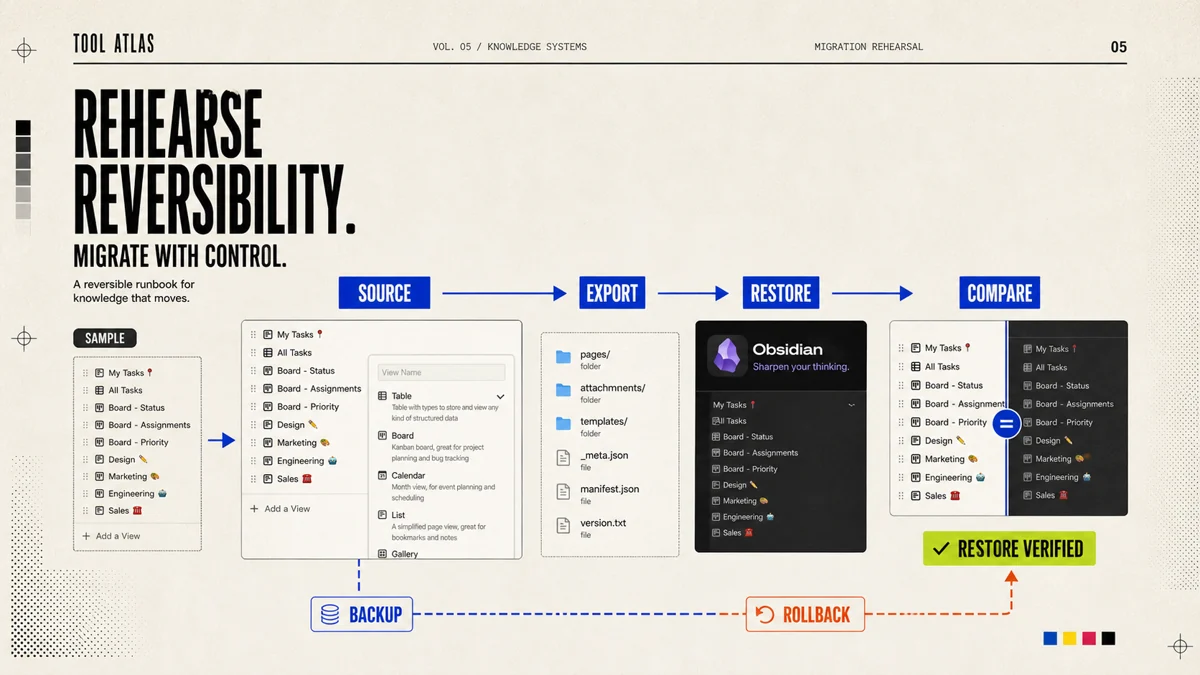
A 30-day migration rehearsal
Week 1: Define the authoritative record
Identify three specific questions, such as:1, 2
- Can I find relevant content written in the past in one minute?
- Is there a single owner and next step for the current project?
- Will core data remain accessible after leaving the software?
At the same time, select a pilot scope and do not migrate all the data at the beginning. A pilot could be an ongoing content project, ten customer records, or research notes from the last three months.1, 2
Week 2: Build the minimum structure
The Notion user only sets the necessary database and attributes, such as status, type, date and person in charge; the Obsidian user only sets a small number of folders, attributes and link specifications; the Feishu user first determines the knowledge base level, document permissions and multi-dimensional table master table.3, 9, 15, 1
The minimum structure should meet one principle: new members or themselves three months later can understand it without reading the instructions.1, 2
Week 3: Test real work
Use it continuously for a week and record the following indicators:1, 2
| indicator | Measurement method |
|---|---|
| Retrieval time | The average time it takes to find the specified data |
| Repeat rate | How many documents with similar content were created in a week |
| Storage resistance | How many steps are required from discovery to completion of saving? |
| Maintenance cost | Time spent organizing properties, links and permissions each week |
| Deliver improvement | Whether to reduce omissions, rework or version confusion |
Week 4: Run the first exit drill
Export pilot content to open on another device or tool. Check if the text, attachments, titles, dates, links, attributes and filenames are available.1, 2
This step is more important than reading the four words "support export". Markdown, CSV or HTML export of Notion, file download of Feishu, and local files of Obsidian all need to go through recovery testing to determine the true exit cost.3, 9, 15, 1
A 90-day adoption plan
Month 1: Prove the system works
Complete small-scale pilots and freeze complex automation and large-scale plug-in installations. The goal is to verify the most basic closed loop of saving, retrieving, modifying and exporting.1, 2
Month 2: Migrate high-value knowledge
Only migrate content that still has value. Establish naming rules, status definitions, knowledge base owners and archiving cycles, and set the principle of least privilege for the team.1, 2
Month 3: Establish governance and exit controls
Determine the backup frequency, export format, permission review cycle, resignation handover process and plug-in review system. Team systems should have at least one designated content owner and one technical or administrative lead to avoid the knowledge base becoming an unmaintained public dump.1, 2
Key risks and controls
| risk | Typical performance | Mitigation measures |
|---|---|---|
| Structural over-engineering | Spend two weeks designing labels and produce no output | Build the structure around three real projects first, then add fields after using it for a month |
| Plugin bloat | Obsidian Installs dozens of plug-ins, which conflict with each other after upgrade | Maintain a core plugin inventory documenting uses, sources, and alternatives |
| Database bloat | Notion Every little thing becomes a database, and the maintenance costs exceed the benefits. | Only objects that require filtering, statistics or collaboration enter the database |
| Permissions leaked | Feishu or Notion external link was mistakenly set to public | Establish defaults to turn off external sharing, regular audits, and sensitive content classification |
| dual source of truth | The same project has different statuses on multiple platforms | Specify a unique master system for each type of object, other platforms only save links or snapshots |
| derived hallucinations | I thought that supporting export means being able to restore | Quarterly sample export and recovery testing |
| Synchronization conflict | Synchronize multiple devices or cloud disks at the same time Obsidian warehouse | A warehouse uses only one master synchronization mechanism and sets up independent backup |
| Organization account dependency | Personal achievements cannot be accessed after resignation. | Regularly export personal works and methodologies that can be legally retained to personal storage |
| AI search misleading | The search snippet looks reasonable but cites an older version | Keep the source link, update time and document status, and return important conclusions to the original text for verification |
| Obsessed with organizing | The knowledge base is getting better and better, but the actual output has not increased. | Measure systems by delivery, speed of decision-making and number of reuses, not number of nodes |
Turn the comparison into a durable operating rule
Decision flow by what you cannot afford to lose
Local control and long-term readability
Choose Obsidian
Do you need complex team collaboration?
YesKeep personal knowledge in Obsidian; use Notion or Feishu Docs for collaboration
NoSet up local backups and keep the plugin list short
Structured management and rapid setup
Choose Notion
Are you handling highly sensitive or long-lived archives?
YesKeep core source material local; use Notion for projects and metadata
NoUse databases and pages as one unified workspace
Multi-person collaboration and organizational governance
Choose Feishu Docs
Do you need to preserve long-term personal knowledge assets?
YesUse Feishu Docs for organizational collaboration; export personal assets regularly or keep them locally
NoDefine knowledge-base permissions and assign a content owner
Relative exit cost by platform
The following scores are qualitative estimates made by the editorial department based on file openness, platform object complexity, permission relationships, and collaboration dependencies, and do not represent a unified benchmark test.1, 2
Migration complexity (editorial estimate)
7, 9, 15A visualization form more suitable for formal publication is a two-dimensional quadrant diagram:1, 2
- Horizontal axis: Personal data control → Platform hosting dependence
- Vertical axis: Personal workflow → Organizational collaboration
- Obsidian is located in the upper left or middle left, representing high control and personal orientation;
- Notion is located in the upper middle, representing the balance of structure and collaboration;
- Feishu is located in the lower right or upper right, depending on the drawing direction, and represents high organizational collaboration and platform integration.
Final verdict by operating model
Notion, Obsidian and Feishu Docs are not three substitutes on the same track.3, 9, 15, 1
Obsidian: Keep durable knowledge in files you control
It is best suited for those who are willing to incur some configuration and maintenance costs in exchange for long-term readability, offline capabilities, free linking, and tooling options. For writers, researchers, developers, photographers, independent creators, and long-termists, this control is often more valuable than short-term convenience.1
Notion: Turn shared knowledge into a structured system
It organizes documents, databases, projects and content in the same space. For freelancers, content teams, product teams and individual entrepreneurs, Notion is the easiest to strike a balance between "flexible enough" and "no need to develop it yourself".3
Feishu Docs: Connect organizational knowledge to execution
It's best suited for teams that already use Feishu as a messaging, conferencing, calendaring and organizational platform. At this time, the document is not just a deposit of knowledge, but an interface that promotes tasks, approvals, collaboration, and responsibility tracking.15, 17
The real thing to be wary of is not the platform lock itself. Any mature working system will create some lock-in, as people invest not just in data but also in structure, processes and habits.1, 2
The dangerous form of lock-in is the one the team cannot locate, measure, or reverse.1, 2
Action priorities
- Determine the source of truth first, then choose the software. Make it clear where the original data, project status, team system and final delivery are stored. Only one master version of similar content is kept.
- Put irreplaceable personal knowledge in a location that can be exported, offline, and readable for a long time. At least one copy of original content, research materials, contract templates, and long-term methodologies should be maintained independent of the collaboration platform.
- Choose by primary work mode, not by occasional needs. Independent writing and research every day, Obsidian is a priority; managing projects and databases every day, Notion is a priority; communicating, approving and editing by multiple people within the organization every day, Feishu is a priority.
- Any platform must first run a thirty-day pilot. Don’t move years of data at once, and don’t design ten layers of tags, twenty databases, or fifty plug-ins during the pilot period.
- Complete a real exit drill within ninety days. Export, restore, check attachments and structures, and confirm that core content can still be retrieved after the subscription is stopped or the account expires.
- Restraint on plugins, automation and AI. They should reduce retrieval and delivery times rather than turning knowledge bases into personal software projects that require long-term maintenance.
- Measuring knowledge systems by output. The most valuable indicators are not the number of pages, tags, and graph nodes, but whether the information can be found again, whether old knowledge can be reused, whether the project can reduce rework, and whether you can make reliable judgments faster.
The final suggestion can be condensed into one sentence:1, 2