
OPEN DATA / DATED PLAN SNAPSHOT
Download the Software Plan Price Index
- Source data verified through
- Dataset version
Reusable under CC BY 4.0 with attribution. Vendor names and marks remain their owners’ property. CC BY 4.0
Initial release · 2026-08-29
Start with the bill your workflow creates
A renewal notice says $10 per user. The finance export says $2,880 a year. Both figures can be correct. The smaller number may describe one entry plan; the larger bill may include twenty seats, a stronger tier, annual commitment, AI credits, and a month in which the old and new systems run together. The first job in a pricing review is to reconcile those two views.3, 4, 6
The public prices in this guide are US reference prices checked on 11 August 2026. They exclude tax, exchange rates, promotions, legacy contracts, negotiated enterprise terms, and regional differences. Treat them as dated comparison inputs, not checkout quotes.1, 3, 4, 6, 7, 9, 10
Modern software bills usually contain four layers. Base is the subscription or license. Access decides which members, editors, administrators, or specialist seats are billable. Usage adds AI credits, automation runs, storage, or API consumption. Switch covers migration, retraining, duplicate subscriptions, integration repair, and the risk of a bad export.2, 5, 6
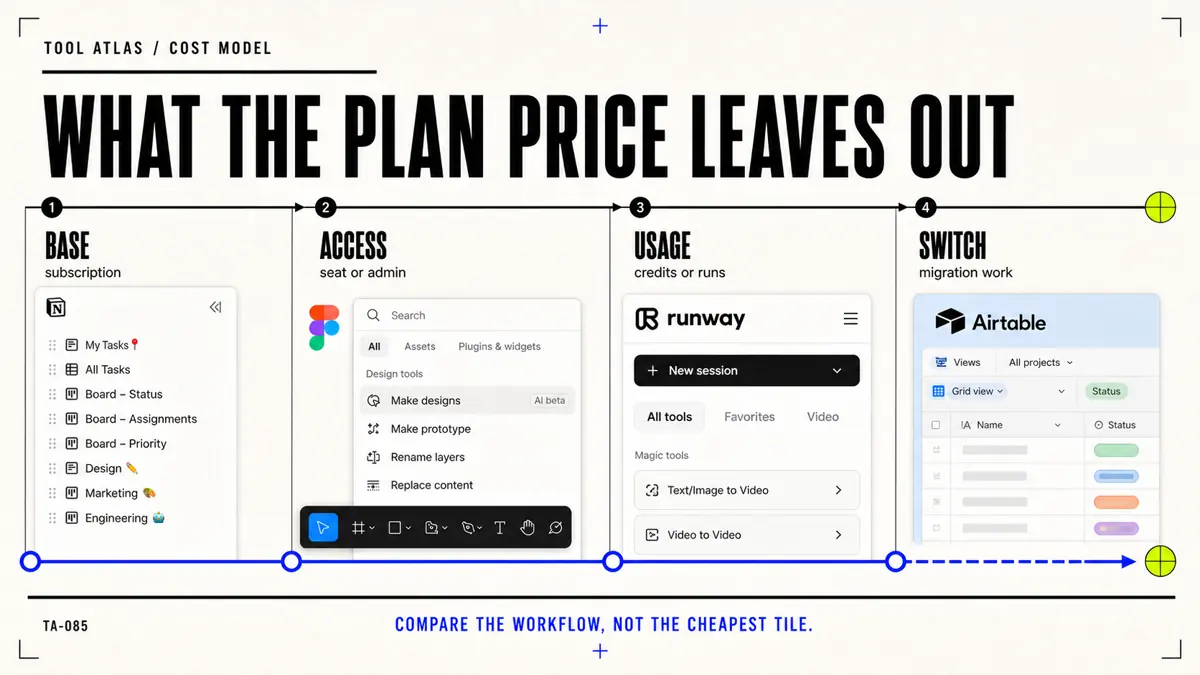
| Cost layer | What to record | Question that exposes the real bill |
|---|---|---|
| Base | Plan, currency, billing cadence, commitment, renewal date | Is the displayed monthly number tied to an annual contract? |
| Access | Full seats, editors, developers, collaborators, guests, administrators | Who needs paid authority rather than view or comment access? |
| Usage | AI credits, generation rates, automation runs, storage, API calls | What does one accepted output consume after retries? |
| Switch | Export, cleanup, migration labor, parallel run, training, rollback | Can the team leave without losing work, permissions, or operating history? |
| Risk | Security, administration, support, auditability, downtime | What would a failed workflow cost beyond the invoice? |
Price permissions, not headcount
Figma, Airtable, and Trello all charge for collaboration, but they do not define a billable collaborator in the same way. A blanket “headcount × headline price” calculation can overstate one product and miss a charge in another.1, 4, 7, 8
Figma lists a Professional Full seat at $16 per month on annual billing. It also offers lower-cost Dev and Collab seats. The purchasing question is therefore not how many people can open a file; it is how many create designs, how many need development inspection and handoff, and how many only review or comment.1
Airtable lists Team at $20 per user per month and Business at $45 on annual billing. Its paid Team and Business workspaces charge users who have edit permissions in at least one base, while read-only collaborators, form submissions, and shared links do not create the same seat charge. Permission design becomes a budget control.4
Trello lists Standard at $5 per user per month, Premium at $10, and Enterprise at $17.50 on annual billing. Standard may be sufficient for a compact Kanban workflow; Premium adds Calendar, Timeline, Table, Dashboard, and Map views. Multi-board guests can become billable workspace members, so an apparently external collaborator can still affect the renewal total.7, 8
| Product | 11 Aug 2026 US reference | Billable unit to inspect | Before buying |
|---|---|---|---|
| Figma | Professional Full seat: $16/month on annual billing | Full, Dev, and Collab seat mix | Map design, handoff, and review jobs to the cheapest sufficient seat |
| Airtable | Team: $20/user/month annually; Business: $45 | Users with edit permission in at least one base | Remove edit authority from people who only read, submit forms, or follow shared links |
| Trello | Standard: $5/user/month annually; Premium: $10; Enterprise: $17.50 | Workspace members and potentially multi-board guests | Pay for stronger views only when the operating workflow uses them |
For a twenty-person product group, begin with a named access map: designers who create, engineers who inspect, operators who edit structured records, and stakeholders who review. Do not buy twenty identical seats and try to recover the mistake later. Recheck the map before every renewal because job ownership changes faster than procurement records.1, 4
AI credits turn a subscription into a production budget
Figma and Runway make the second pricing shift visible: access and consumption now sit on the same invoice. Figma’s Professional Full seat includes 3,000 monthly AI credits; Organization and Enterprise Full seats include different allowances, and additional credits can be purchased. A seat decision can therefore change both permissions and available AI capacity.1, 2
Runway’s annual plans list Standard at $12 per month with 625 monthly credits, Pro at $28 with 2,250, and Max at $76 with 9,500. Monthly billing is higher. Different image and video models consume credits at different rates; the pricing page shows, for example, a five-second Gen-4.5 generation consuming 60 credits.6
That makes “Runway costs $12 a month” an incomplete planning sentence. A creator needs to estimate the number of attempts, duration, model, resolution, rejected outputs, and finishing work required for one deliverable. The relevant unit is not a generated clip. It is an accepted clip that survives review.6
Notion’s US pricing page lists Plus at $10 per seat per month and Business at $20, with Enterprise quoted separately. Business bundles AI workspace capabilities, while some Custom Agent work can consume separately purchased Notion credits. The bundle may remove the need for another product, or it may introduce a new usage budget. Only the actual workflow can answer which.3
Airtable combines paid editors with additional AI credit packs. That is a useful warning for every AI-enabled work platform: reducing seat count does not automatically control usage cost, and buying a large allowance does not prove the team produces more useful work.4, 5
| Product | Base reference | Included or variable layer | Useful denominator |
|---|---|---|---|
| Figma | Professional Full: $16/month annually | 3,000 monthly AI credits for that seat at the checked date | Approved design or handoff completed, not prompts sent |
| Runway | Standard $12 / Pro $28 / Max $76 per month annually | 625 / 2,250 / 9,500 monthly credits; model rates vary | Accepted production seconds after retries and finishing |
| Notion | Plus $10 / Business $20 per seat/month | Bundled AI capabilities; some Custom Agent work uses purchased credits | Reviewed knowledge or operating task completed |
| Airtable | Team $20/user/month annually | Additional AI credit packs available | Approved automation or record workflow completed |
Document tools expose three different ways to pay
Nitro PDF, PDFgear, and ONLYOFFICE DocSpace look adjacent in a search report because all three touch documents. Their billing models and buying decisions are different.9, 11, 10
Nitro presents a PDF Standard subscription around $15 per user per month on annual billing and also promotes a Classic option based on a one-time payment for a three-year Windows license. A professional user comparing those routes needs to include platform fit, upgrade rights, deployment, support, and the expected replacement date—not only divide the one-time price by 36.9
PDFgear currently presents its desktop and online editing, conversion, signing, and common PDF utilities as free. Its own explanation of the model leaves room for advanced cloud or AI features to become paid later. “Free at the checked date” is a useful observation; “free forever” is not an evidence-based procurement assumption.11, 12
ONLYOFFICE DocSpace uses administrators rather than every participant as the central billing unit. Its Startup cloud plan allows up to three administrators with unlimited users and guests; Business starts at $20 per administrator per month and adds stronger storage and administration. A collaboration room with many external participants can therefore have very different economics from per-user SaaS.10
| Reader | Start with | Upgrade or switch when |
|---|---|---|
| Occasional PDF user | Test PDFgear or an operating-system utility on representative files | A required OCR, form, conversion, signature, or privacy workflow fails |
| Professional document operator | Compare Nitro and specialist PDF editors on difficult files | Reliability, batch work, redaction, accessibility, or client delivery justifies paid control |
| Collaboration owner | Model DocSpace by administrators and external participation | Storage, administration, support, or governance exceeds the Startup boundary |
| Organization | Run a controlled file and deployment pilot | Auditability, support, identity, policy, or deployment requirements eliminate consumer routes |
The cheapest route wins only if it completes the same job with an acceptable failure boundary. A no-cost editor that mishandles the one regulated form you submit every week is expensive; a paid editor used twice a year for trivial annotations may be unnecessary.9, 11
Build a total-cost worksheet before comparing alternatives
A useful worksheet keeps known vendor charges separate from internal estimates. Do not hide migration labor inside “miscellaneous,” and do not convert a quote-only or regional price into a precise global total.1, 6, 10
The final term matters. A new product does not create savings while the old subscription remains active indefinitely. Savings begin after files, permissions, integrations, and owner acceptance have been verified and the previous plan is downgraded or cancelled.8, 4
| Field | Evidence or estimate | Owner | Review trigger |
|---|---|---|---|
| Plan and cadence | Official plan page captured with date, region, and currency | Procurement or operator | Page, term, or renewal changes |
| Seat map | Named job and required authority for each billable user | Team lead | Role, project, or contractor changes |
| Usage | Credits or runs consumed by accepted outputs, including retries | Workflow owner | Allowance exceeds 70% or production pattern changes |
| Integration | Setup, API, automation, and maintenance time | Technical owner | Connector failure or vendor boundary changes |
| Migration | Export, cleanup, import, validation, training, and parallel run | Migration owner | Pilot exposes missing data or behavior |
| Exit | Export formats, account closure, retained copies, rollback | Data owner | Before purchase and before renewal |
Build three scenarios rather than one forecast: current usage, credible growth, and a stress month. For Runway, vary retries and model choice. For Airtable, vary paid editors and automation or AI consumption. For Figma, vary the Full, Dev, and Collab mix. A plan that works only in the most optimistic month is not the low-cost route.1, 5, 6
Pilot the hardest representative workflow
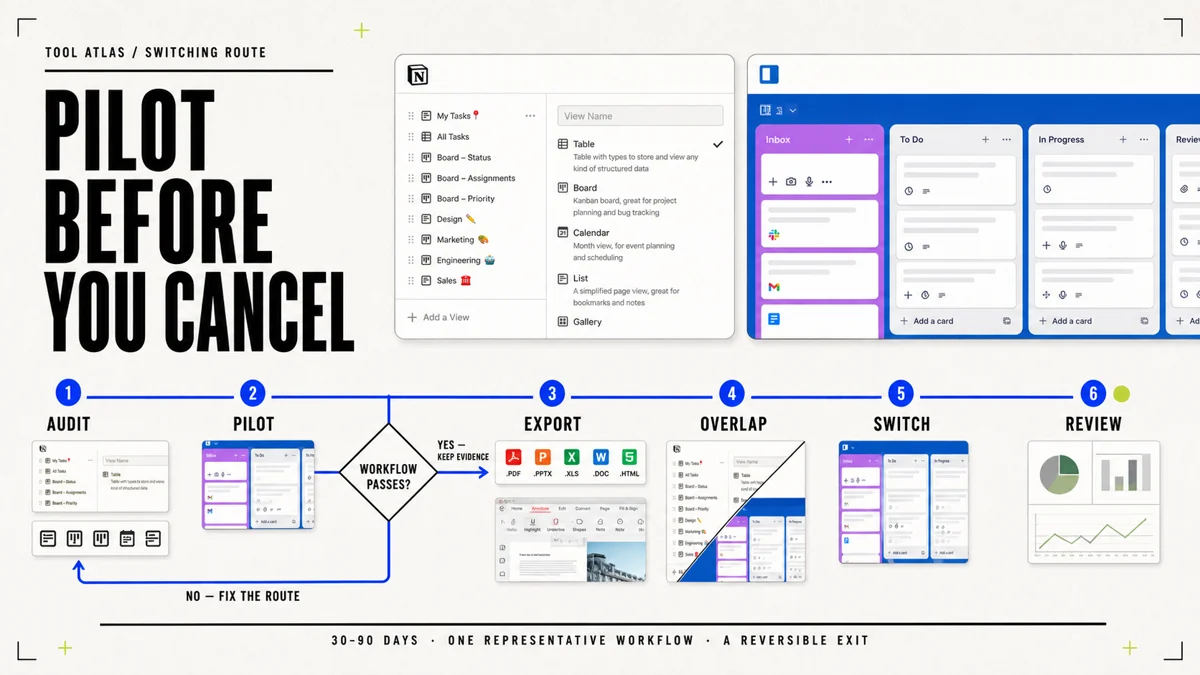
A pricing grid cannot prove that an alternative preserves the work. Before cancellation, move one representative project through the candidate system from input to accepted output. Choose a project difficult enough to expose the failure that would stop the migration.1, 3, 4, 6
- Figma: take one design through component use, developer inspection, comments, export, and implementation handoff.
- Notion: move a database with properties, views, permissions, links, attachments, and a recurring team procedure.
- Airtable: rebuild one base with its forms, automations, interfaces, edit permissions, and downstream records.
- Runway: complete enough iterations to measure credits per accepted asset, not one lucky generation.
- Trello: reproduce the boards, guests, views, and automations that carry a real operating cadence.
- Nitro or PDFgear: test the hardest OCR, form, signature, conversion, redaction, and final-file checks in the actual environment.
Define success before the trial starts. Record required output, acceptance owner, maximum manual repair, data that must survive, permissions that must remain correct, and the rollback point. A demo that succeeds after the vendor chooses the sample is not your pilot.4, 6
Run both systems briefly after the pilot passes. The overlap is an intentional migration cost, not waste: it buys time to compare outputs, recover missed records, and stop before an irreversible cutover. Put an end date and owner on the overlap so caution does not become permanent double payment.3, 8
Make the 30–90 day purchase decision
The clock starts with a workflow problem, not a preferred logo. During the first week, audit current users, permissions, plan cadence, usage, integrations, renewal dates, and annualized cost. Then define the few capabilities the workflow cannot lose.1, 4, 6
Shortlist two or three alternatives and run the representative pilot. If it fails, document the failure and either repair the route or reject the candidate. If it passes, export and validate data, run a bounded overlap, migrate the team and integrations, then downgrade or cancel the old plan. Thirty days after cutover, review actual cost, adoption, manual repair, support load, and unused access.8, 11
| Decision | Evidence that supports it | Action before the renewal date |
|---|---|---|
| Renew | The current route passes the workflow, usage is understood, and switching cannot recover its cost | Correct unused access and record the next review date |
| Downgrade | Stronger views, AI allowance, administration, or specialist seats are no longer required | Pilot the lower tier and confirm exports, permissions, and history remain usable |
| Change seat mix | Work is sound but paid authority is assigned too broadly | Move reviewers, guests, or specialists to the cheapest sufficient access type |
| Add usage budget | The tool produces accepted outputs and the allowance is the real bottleneck | Approve a measured cost per accepted outcome and set an alert threshold |
| Switch | A candidate passes the representative workflow and first-year savings exceed migration and risk cost | Export, validate, overlap briefly, cut over, cancel, and review after 30 days |
| Keep both | The products perform distinct jobs that survive a paid-plan overlap review | Name each job and owner; reject vague “sometimes useful” duplication |
How much does Figma cost in 2026?
At the checked US reference, Figma Professional starts at $16 per month for a Full seat on annual billing. Dev and Collab seats cost less, while Organization and Enterprise add administration and other capabilities at higher prices. Build a seat map before multiplying by headcount.1
How much does Notion cost per month?
Notion’s checked US page lists Plus at $10 per seat per month and Business at $20, with Enterprise quoted separately. AI capabilities and separately purchased credits for some agent workloads can change the relevant total.3
Is Airtable more expensive than Trello?
The checked annual references put Airtable Team at $20 per user per month, Trello Standard at $5, and Trello Premium at $10. That is not an equal-work comparison: Airtable centers structured databases and application-like workflows; Trello centers visual work management. Compare the workflow, edit permissions, required views, and automation before comparing totals.4, 7
How much does Runway cost?
The checked annual references list Runway Standard at $12 per month, Pro at $28, and Max at $76, each with a different monthly credit allowance. The useful budget depends on model choice, duration, retries, and accepted production output.6
What should I compare before switching software?
Compare annualized vendor cost, billable-user definitions, AI or usage limits, integrations, export quality, permissions, security and administration requirements, migration labor, parallel-run time, and rollback. Cancel only after a representative pilot and validated export.1, 4, 6, 8